Shopify Cart Abandonment Strategies: 13 Tactics to Recover Lost Revenue (2026)
You’re losing money every single hour your Shopify store is live. The average ecommerce cart abandonment rate sits at 70.19% globally, according to the Baymard Institute’s 2025 meta-study of 49 sources — meaning roughly 7 out of every 10 shoppers who add a product to their cart never complete the purchase. For a Shopify store doing $500K/year, that’s potentially $1M+ in revenue sitting on the table. Implementing the right Shopify cart abandonment strategies is the highest-ROI work you can do right now, period.
- The #1 reason shoppers abandon carts is unexpected costs at checkout — fix this first before anything else.
- A 3-email Klaviyo abandonment flow (1hr, 24hr, 72hr) consistently outperforms single-email approaches by 63% in recovered revenue.
- Enabling Shop Pay alone can lift Shopify checkout conversion rates by up to 50% versus guest checkout.
- Exit-intent popups, when properly timed with a discount or social proof, reduce abandonment by 10–15% on average.
- Retargeting abandoned cart shoppers via Meta Ads with dynamic product ads delivers 3–5x ROAS compared to cold audiences.
Why Cart Abandonment on Shopify Costs More Than You Think
Most store owners look at their conversion rate and shrug. They shouldn’t. A 1-percentage-point improvement in checkout conversion for a store with 10,000 monthly visitors at a $75 AOV generates $7,500 in additional monthly revenue — without spending a cent more on traffic.
The math works in your favor because cart abandoners are warm leads. They’ve already found your store, evaluated your product, and signaled buying intent. Recovering even a fraction of them is dramatically cheaper than acquiring new customers through paid ads.
Shopify’s own data from 2025 shows that merchants using the platform’s built-in abandoned checkout emails recover between 3% and 5% of abandoned carts. That’s a useful baseline — but top-performing stores using a full multi-channel recovery stack hit 12–18% recovery rates consistently.
Why Does Cart Abandonment on Shopify Happen?
Understanding the root causes is non-negotiable before you start patching symptoms. Baymard Institute’s 2025 UX research, drawing on 4,560 U.S. adult online shoppers, identified the most common reasons for cart abandonment at checkout.
| Reason for Cart Abandonment | % of Abandoning Shoppers | Shopify Fix Category |
|---|---|---|
| Extra costs too high (shipping, tax, fees) | 47% | Pricing transparency / Free shipping threshold |
| Required to create an account | 25% | Guest checkout / Shop Pay |
| Delivery too slow | 24% | Carrier selection / Delivery messaging |
| Didn’t trust the site with credit card info | 19% | Trust badges / SSL / Reviews |
| Too long or complicated checkout process | 18% | Checkout UX / One-page checkout |
| Couldn’t see or calculate total cost upfront | 17% | Cart drawer cost display |
| Website had errors or crashed | 13% | Page speed / QA testing |
| Unsatisfactory return policy | 12% | Returns page / Policy visibility |
| Not enough payment methods | 9% | Payment gateway diversification |
Each of these maps to a specific fix in your Shopify admin or theme. The table above should be your diagnostic checklist — run through it before building any recovery campaign.
The Browsing Abandonment Problem
Not all abandonment happens at checkout. A large percentage of shoppers add items to their cart during a “browse and save” session with no immediate intent to buy. Listrak’s 2025 retail benchmark report found that 58.6% of US internet users admit to adding items to carts to save them for later — they’re using your cart like a wishlist.
This means your recovery strategy needs to cover both checkout abandoners (high intent, friction-driven) and cart abandoners (medium intent, timing-driven). Different triggers, different messaging, different urgency levels.
What Are Shopify Cart Abandonment Strategies?
Shopify cart abandonment strategies are the combination of technical fixes, automated marketing flows, and UX improvements designed to either prevent shoppers from leaving before purchase or re-engage them after they’ve left.
They fall into three buckets:
- Prevention strategies — removing friction before it causes abandonment (checkout speed, trust signals, payment options)
- On-site recovery strategies — capturing intent before the shopper leaves your site (exit-intent popups, cart persistence, live chat)
- Post-abandonment recovery strategies — re-engaging shoppers after they’ve left (email flows, SMS, retargeting ads)
The highest-performing Shopify stores run all three in parallel. Treating cart recovery as only an email problem is the most common mistake merchants make — and it caps your recovery rate well below what’s achievable.
How to Fix Shopify Cart Abandonment: 13 Specific Tactics
1. Activate Shopify’s Native Abandoned Checkout Emails (Floor, Not Ceiling)
Start here because it takes 5 minutes and costs nothing. In your Shopify admin, go to Marketing → Automations → Abandoned checkout. Enable the built-in email and set it to send 1 hour after abandonment. Shopify automatically includes the cart contents and a recovery link.
This is your floor — not your ceiling. Native abandoned checkout emails convert at roughly 3–5%. Use this while you set up a proper Klaviyo flow in parallel.
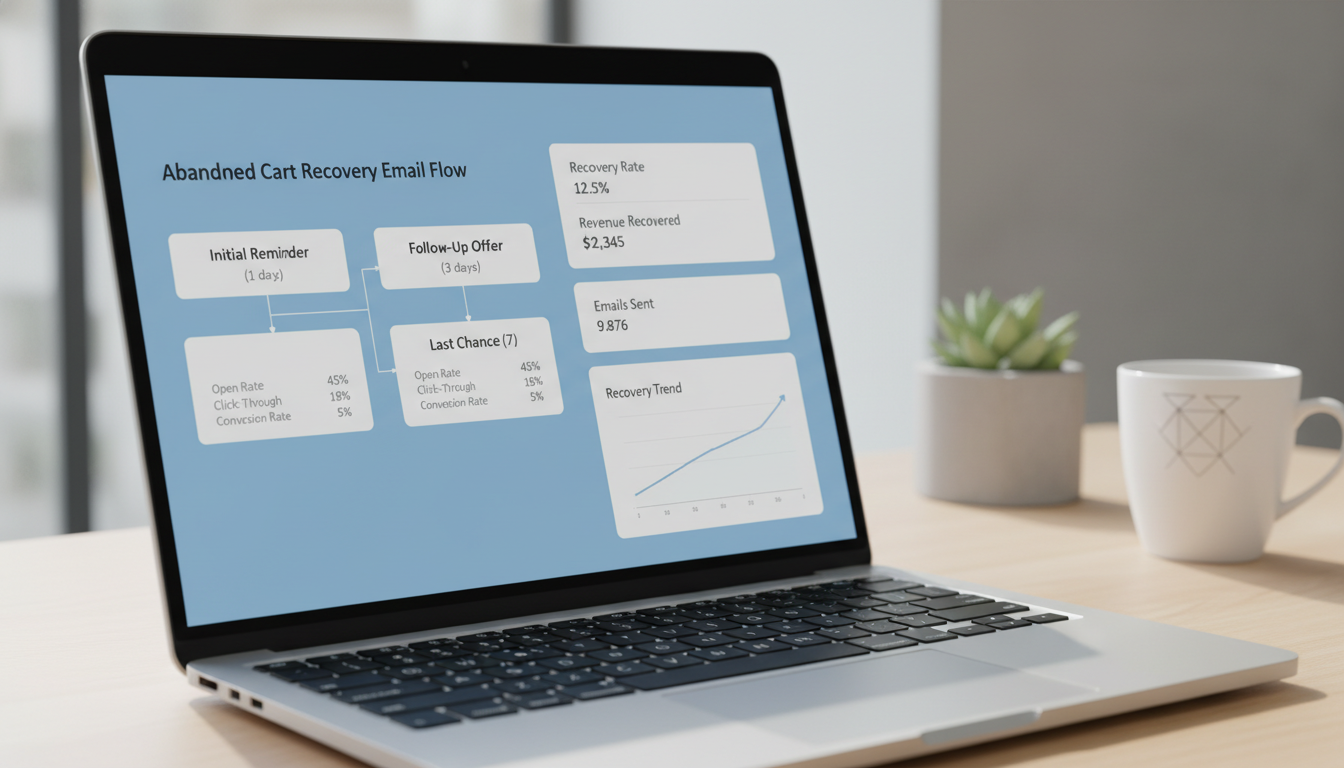
2. Build a 3-Part Klaviyo Abandoned Cart Email Flow
Klaviyo’s abandoned cart flow is the single highest-ROI email automation most Shopify stores aren’t fully using. Klaviyo’s own 2025 benchmark data shows that 3-email abandonment sequences generate 63% more revenue than single-email sends.
Structure the sequence like this:
- Email 1 — 1 hour after abandonment: Simple reminder, product image, no discount. Subject line: “You left something behind.” This captures the impulse buyers who got distracted.
- Email 2 — 24 hours after abandonment: Add social proof. Include star ratings via Okendo or Judge.me, a short UGC testimonial, and a soft nudge. No discount yet — you don’t want to train customers to abandon carts for coupons.
- Email 3 — 72 hours after abandonment: Introduce urgency or an incentive. Use a low-stock warning (only show this if it’s real — Klaviyo can pull live inventory via the Shopify integration), or a 10% off code with a 24-hour expiry.
In Klaviyo, set this up under Flows → Create Flow → Browse Library → Abandoned Cart. Use the Shopify integration trigger “Checkout Started” for maximum breadth — this fires even for users who didn’t reach the payment page.
3. Add Abandoned Cart SMS via Klaviyo or Postscript
SMS abandonment messages have an open rate of 98% versus 20–25% for email, according to SimpleTexting’s 2025 SMS marketing report. Send a short SMS 30 minutes after abandonment — before your first email — with a direct link back to the checkout.
In Klaviyo, add an SMS step at 30 minutes as the first touchpoint in your abandoned cart flow. Keep it to two sentences max. “Your cart is still waiting. Tap here to finish your order: [link].” Postscript is the alternative if you want SMS-specific analytics and compliance tools built for Shopify.
4. Enable Shop Pay and Accelerated Checkouts
The “required account creation” friction (responsible for 25% of abandonment) is largely solved by Shop Pay. Go to Settings → Payments → Shopify Payments → Enable Shop Pay. Also enable Apple Pay and Google Pay in the same panel.
Shopify reports that Shop Pay increases checkout-to-order conversion by up to 50% compared to regular checkouts, and by 10% versus other accelerated checkout options. For mobile shoppers specifically — who now represent over 65% of Shopify traffic — this is non-negotiable.
5. Display a Free Shipping Progress Bar in the Cart
Unexpected shipping costs drive 47% of abandonments. The most effective preventive fix is a dynamic free shipping threshold bar in your cart drawer. When a shopper sees “Add $12.50 more for free shipping,” average order value goes up and abandonment goes down simultaneously.
Apps like Cart X or Slide Cart Drawer (both Shopify App Store) add this in under 15 minutes without touching your theme code. Set the free shipping threshold at Settings → Shipping and delivery → Create shipping zone → Add rate → Free shipping, then configure the app to match that threshold.
6. Install Hotjar and Audit Your Checkout Funnel
Before making any further UX changes, watch where people actually drop off. Install Hotjar via the Shopify App Store (or paste the tracking snippet in your theme’s theme.liquid) and enable session recordings filtered to users who reached the cart but didn’t purchase.
Look for: rage clicks on disabled buttons, form fields that users abandon, error messages that appear and disappear, and scroll depth on mobile. Cross-reference with Google Analytics 4‘s Funnel Exploration report (Explore → Funnel Exploration) using these steps: Product Page → Cart → Checkout Information → Checkout Payment → Order Confirmation. The step with the highest drop-off is your priority fix.
7. Implement Exit-Intent Popups With a Specific Offer
Exit-intent popups shown at the moment a desktop user’s cursor moves toward the browser’s close button or address bar — convert at 3–11% on average when the offer is specific and relevant (Sleeknote, 2025). Generic “Wait! Don’t go!” popups convert at under 1%.
Use OptiMonk or Privy (both integrate natively with Shopify) and configure them to fire only on cart or checkout pages when exit intent is detected. Show the actual product in the popup, display a count of recent purchases (“47 people bought this today” — use real data), and offer a time-limited 5–10% discount. Suppress the popup for existing subscribers to avoid discount dilution.
8. Use Rebuy for Personalized Cart Upsells That Increase AOV
Increasing AOV at the cart stage changes the abandonment math entirely. A shopper who goes from $38 to $65 AOV is now above your free shipping threshold — removing the #1 abandonment trigger automatically.
Rebuy integrates with Shopify to show AI-driven product recommendations inside the cart drawer, on the cart page, and in the post-purchase flow. Configure it under the Rebuy dashboard’s “Widgets” section, set the placement to “Cart,” and select your recommendation algorithm (frequently bought together or “customers also viewed” work best for AOV lift).
9. Speed Up Your Store With PageSpeed Insights Fixes
Google’s 2024 research found that a 1-second delay in page load time reduces conversion rates by 7%. A store loading in 5 seconds versus 2 seconds loses a measurable slice of customers before they ever reach the cart. Run your store through Google PageSpeed Insights and prioritize the “Opportunities” flagged for your mobile score.
The most common Shopify-specific fixes that move the needle:
- Compress images with Crush.pics or TinyIMG (both available on the Shopify App Store)
- Remove unused apps — every installed Shopify app can inject JavaScript that adds 100–400ms of load time, even if you’re not actively using it
- Use a Shopify 2.0 theme (Dawn, Impulse, Prestige) — they’re built with lazy loading and deferred JavaScript by default
- Enable lazy loading for product images natively in Online Store → Themes → Edit code → Sections → product-grid.liquid
10. Add Trust Signals Directly on the Cart Page
19% of shoppers abandon because they don’t trust the site with their payment information. Most Shopify themes don’t show trust signals on the cart page — they’re relegated to footers and product pages. Move them where the buying decision is actually made.
Add the following to your cart page template (Online Store → Themes → Edit code → Templates → cart.liquid or via a custom section in a 2.0 theme):
- SSL/secure checkout badge (Shopify SSL is automatic — make it visible)
- Payment method icons (Visa, Mastercard, Amex, PayPal, Shop Pay)
- A one-line return policy summary (“Free 30-day returns, no questions asked”)
- A star rating summary pulled from Okendo or Judge.me showing your overall store rating
11. Launch Dynamic Retargeting Ads on Meta and Google
Email reaches people who gave you their address. Retargeting reaches everyone else. Connect your Shopify store to the Meta Pixel (via Sales Channels → Facebook & Instagram → Connect account) and enable the Conversions API for server-side tracking — critical for accuracy post-iOS 17.
Create a custom audience of “AddToCart but not Purchase” in Meta Ads Manager with a 7-day window. Target this audience with dynamic product ads that show the exact product they added. WordStream’s 2025 ecommerce benchmark report found that retargeting abandoned cart visitors on Meta generates a 3–5x ROAS versus cold audiences for Shopify stores in the $100K–$2M revenue range.
12. Implement Cart Persistence Across Sessions and Devices
Shopify natively persists cart contents for 14 days for logged-in customers. For guest users on the same browser, the cart also persists — but the moment they switch devices (phone to laptop), the cart disappears. This is a silent abandonment driver.
Encourage account creation at the post-purchase stage rather than at checkout. Use Shopify’s “New Customer Account” system (enabled under Settings → Customer accounts → New customer accounts) — it uses a one-click email magic link, eliminating password friction. Once customers have accounts, their carts sync across devices.
13. Test Checkout Extensions to Remove Friction
Shopify’s checkout extensibility (available to Shopify Plus merchants on upgraded plans and increasingly to standard merchants in 2025–2026) lets you add custom UI components to checkout without touching the checkout.liquid file. Use Checkout Extensions to add:
- A one-line reassurance message at the top of checkout (“Free shipping on this order · Free returns · Secure checkout”)
- A delivery date estimator using apps like Estimated Delivery Date from the Shopify App Store
- Loyalty points balance display via LoyaltyLion or Smile.io — reminding shoppers they’ll earn points on this purchase is a documented conversion lift
Access Checkout Extensibility under Settings → Checkout → Customize in a Shopify Plus account, or via the Shopify Theme Editor for standard plans using checkout UI extensions from approved apps.
How to Prevent Cart Abandonment on Shopify Long-Term
Recovery campaigns are essential — but prevention compounds faster. Every dollar you spend reducing abandonment before it happens saves you the cost of re-acquiring that shopper through email, SMS, or paid ads. Here’s how to build a sustainable prevention system.
Set a Competitive Free Shipping Threshold
NRF’s 2025 retail survey found that 75% of US consumers expect free shipping on orders over $50. If your free shipping threshold is $100 and your AOV is $65, you’re creating friction by design. Audit your shipping economics and consider reducing the threshold, building shipping cost into product pricing, or using tiered thresholds ($35 for standard, $75 for expedited).
Monitor Abandonment Rate in GA4 Weekly
Set up a custom report in Google Analytics 4 → Explore → Funnel Exploration tracking your checkout funnel weekly. Your target benchmark: a checkout abandonment rate (cart to confirmed purchase) below 50% is achievable for optimized Shopify stores, compared to the 70% industry average. Any week your rate spikes above baseline is a signal that something broke — a theme update, a payment gateway issue, or a price change.
Run A/B Tests on Cart Page Copy and Layout
Use Google Optimize’s successor, VWO or AB Tasty (both integrate with Shopify via script tag or Shopify App Store), to test specific cart page elements. High-impact variables to test: CTA button color and copy (“Proceed to Checkout” vs. “Complete My Order”), the placement of your free shipping threshold bar, and whether showing the estimated delivery date in the cart reduces abandonment.
Run tests for a minimum of 2 weeks and 500+ sessions per variant before calling a winner. Moving fast on underpowered tests is how bad decisions get made permanent.
What Is the Average Cart Abandonment Rate for Shopify Stores?
The average cart abandonment rate across all ecommerce platforms including Shopify sits at 70.19% (Baymard Institute, 2025 aggregate). Shopify-specific data from Littledata’s 2025 Shopify benchmark report, which analyzed over 3,500 Shopify stores, found that the median cart abandonment rate for Shopify stores is 76.4% — slightly higher than the cross-platform average, likely because Shopify’s scale means more mobile-first, impulse-browse traffic.
However, the range is enormous. The top 25% of Shopify stores achieve cart-to-purchase conversion rates above 4.8% (implying sub-52% abandonment), while the bottom 25% see rates below 0.9% (over 91% abandonment). The difference between top and bottom quartile performance isn’t traffic quality — it’s checkout UX, trust signals, and post-abandonment recovery infrastructure.
Here’s how abandonment rates break down by industry category for Shopify stores, based on Littledata’s 2025 benchmarks:
| Industry / Store Category | Median Cart Abandonment Rate | Top-Quartile Abandonment Rate |
|---|---|---|
| Fashion & Apparel | 79.2% | 54.1% |
| Health & Beauty | 74.6% | 48.9% |
| Home & Garden | 77.8% | 52.3% |
| Sports & Outdoors | 75.1% | 50.7% |
| Electronics & Tech | 80.4% | 56.2% |
| Food & Beverage (DTC) | 71.3% | 44.8% |
| Subscriptions / CPG | 68.7% | 41.2% |
Use your industry’s top-quartile rate as your 12-month target, not the median. The median tells you what average stores do; the top quartile tells you what’s achievable with deliberate optimization.
One critical nuance: don’t benchmark your store’s overall abandonment rate — benchmark your checkout abandonment rate separately from your cart abandonment rate. Shopify surfaces these as different events in GA4. Checkout abandonment (reaching checkout but not completing) is the higher-intent, more recoverable population. Focus recovery resources there first.
How to Measure Whether Your Shopify Cart Recovery Is Actually Working
Tactics without measurement are guesses. These are the specific metrics to track, where to find them, and what good looks like.
Abandoned Cart Recovery Rate
This is recovered carts divided by total abandoned carts. Find it in Klaviyo → Analytics → Flows → [Your Abandoned Cart Flow] → Revenue or in your Shopify admin under Marketing → Campaigns → Abandoned checkouts. A recovery rate of 5–8% is table stakes; top performers hit 12–18% with a full multi-channel stack.
Flow Revenue per Recipient
In Klaviyo, this tells you the average revenue generated per person who enters your abandoned cart flow. Industry average is $3–$6 per recipient. If yours is below $2, your email copy, offer structure, or flow timing needs work.
Checkout Funnel Drop-off by Step
In GA4, your Funnel Exploration report shows the exact percentage of users who drop off at each checkout step. If you see a 40%+ drop-off at “Payment Information” specifically, a payment method or trust signal issue is the likely cause. If it’s at “Shipping Information,” your delivery costs or options are the problem.
Cart Page Bounce Rate
Hotjar session recordings on the cart page tell you the qualitative story. GA4 gives you the quantitative baseline. If more than 60% of users who reach your cart page leave without interacting at all, your cart page has a UX or value proposition problem — not a recovery problem.
Putting It All Together: Your 30-Day Cart Recovery Action Plan
Running all 13 tactics simultaneously isn’t realistic. Sequence them by impact and effort:
- Week 1 — Quick wins: Enable Shop Pay, turn on Shopify’s native abandoned checkout email, install Hotjar, run PageSpeed Insights and fix your top 3 mobile issues.
- Week 2 — Email & SMS: Build your 3-part Klaviyo abandoned cart flow. Add an SMS touchpoint at 30 minutes if you have a subscriber list. Set up your GA4 funnel exploration report.
- Week 3 — On-site UX: Add a free shipping progress bar, add trust signals to the cart page, and set up an exit-intent popup on OptiMonk or Privy with a specific offer.
- Week 4 — Paid retargeting: Set up Meta dynamic product ads targeting your “AddToCart, not Purchase” audience. Verify your Conversions API is firing correctly alongside the Pixel.
By day 30, you’ll have a complete three-layer recovery system — prevention, on-site, and post-abandonment — running simultaneously. Most Shopify stores that implement this full stack see a 2–4 percentage point improvement in overall store conversion rate within 60 days, which at a $500K annual revenue run rate translates to $40K–$80K in additional recovered revenue per year without increasing ad spend.
Cart abandonment isn’t a problem you solve once — it’s a system you continuously optimize. The stores beating the industry benchmarks by 20+ points aren’t doing anything exotic. They’re executing the fundamentals listed above, measuring weekly, and iterating fast. Start with Week 1 today, and you’ll be ahead of the majority of Shopify merchants by next month.