
Shopify Headless Commerce: 12 Pros, Cons & Real Decisions (2026)
Most Shopify store owners hear “headless” and immediately think it’s either the future of their business or a rabbit hole that will drain their development budget. The truth is more nuanced — and more expensive to get wrong. Shopify headless commerce is the right call for a specific profile of merchant, and the completely wrong call for most others. According to a 2025 Gartner Digital Commerce report, only 22% of mid-market merchants who adopted headless architecture saw a measurable ROI within 18 months — yet nearly 60% cited it as a primary technical initiative. That gap costs real money.
This guide breaks down exactly what headless Shopify means, who it genuinely benefits, what it will cost you in time and dollars, and how to make the right architectural decision for where your store sits today.
- Shopify headless commerce decouples the frontend presentation layer from Shopify’s backend — giving you full UI freedom at the cost of significant dev overhead.
- Core Speed advantages are real but often overstated — a well-optimized traditional Shopify theme can match headless Core Web Vitals scores in most cases.
- Headless makes sense above ~$1M–$2M GMV when custom experience ROI outweighs infrastructure cost.
- The Shopify Storefront API and Hydrogen framework (v2) are the two primary paths to going headless on Shopify in 2026.
- Hidden costs — DevOps, CDN management, API versioning, and app compatibility — routinely double initial headless project estimates.
What Exactly Is Shopify Headless Commerce?
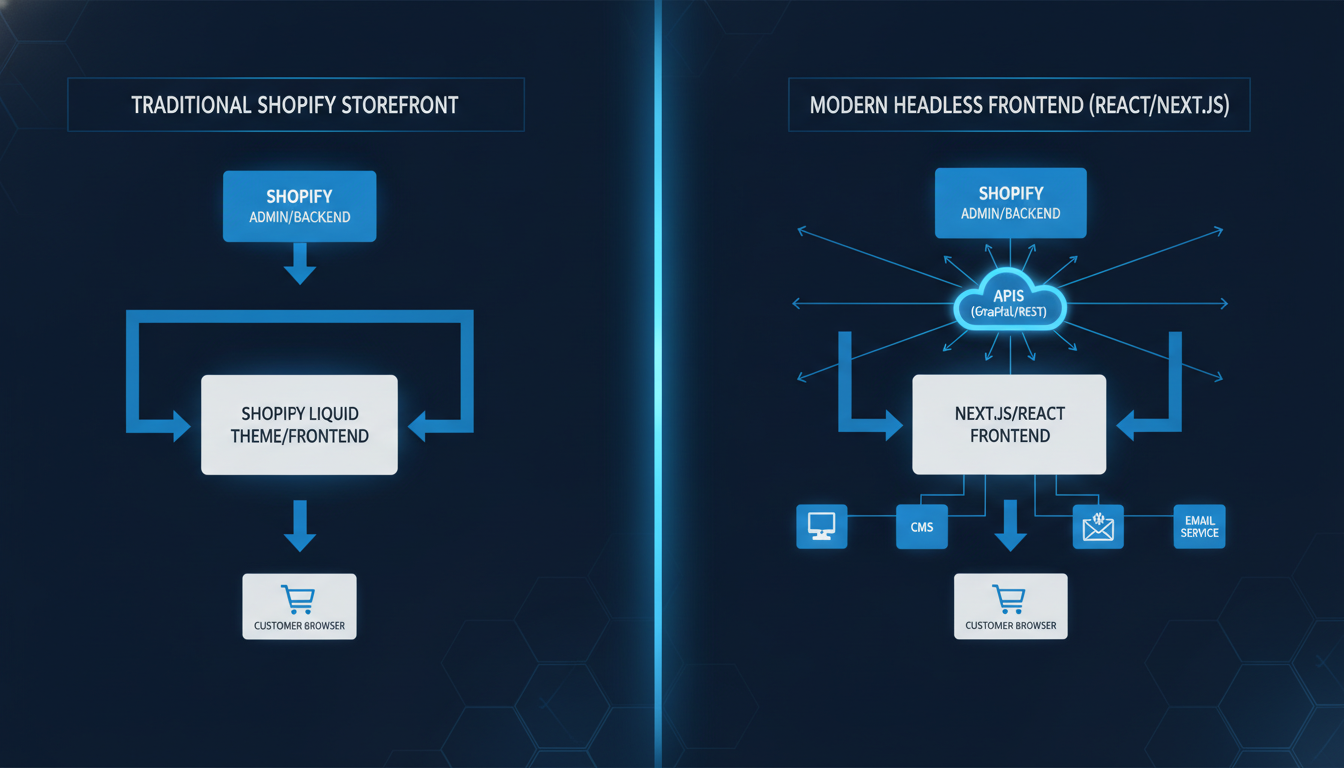
In a traditional Shopify setup, the frontend (what your customer sees) and the backend (products, orders, payments, inventory) are tightly coupled inside Shopify’s platform. Your theme — built in Liquid — lives inside Shopify and renders pages on their servers.
Headless commerce breaks that connection. The Shopify backend handles commerce logic — checkout, product catalog, inventory, payments, customer accounts — while a completely separate frontend application, typically built in Next.js or Remix, handles what the customer sees. These two systems communicate exclusively through APIs, specifically Shopify’s Storefront API (GraphQL) and, for internal operations, the Admin API.
Shopify’s own headless framework, Hydrogen v2 (built on Remix), launched in late 2023 and has matured significantly through 2025. It gives you a Shopify-native React framework with pre-built commerce components, deployed via Oxygen — Shopify’s own global edge hosting. This is now the recommended headless path for most Shopify merchants going headless, replacing the earlier DIY Next.js + Storefront API approach for many teams.
Traditional Shopify vs. Headless Shopify: The Core Difference
The simplest way to think about it: in a traditional setup, Shopify controls both the engine and the body of the car. In a headless setup, Shopify owns the engine (commerce logic) and you build your own custom body (frontend experience) on top of it.
| Attribute | Traditional Shopify (Liquid) | Shopify Headless (Hydrogen / Custom) |
|---|---|---|
| Frontend Language | Liquid (Shopify-proprietary) | React, Next.js, Remix, Vue, etc. |
| Hosting | Shopify-managed | Oxygen (Shopify) or Vercel, Netlify, AWS |
| Theme Customization | Limited to Liquid + Section schema | Unlimited — full code control |
| App Compatibility | Near-universal (Shopify App Store) | Partial — many apps require Liquid injection |
| Median Time-to-Launch | 4–12 weeks (new theme) | 16–32 weeks (new headless build) |
| Core Web Vitals (LCP) Potential | 1.8–2.8s (optimized Dawn/custom theme) | 0.8–1.6s (optimized Hydrogen build) |
| Developer Profile Required | Shopify Liquid developer | Full-stack JS engineer + Shopify API expertise |
| Monthly Infrastructure Cost | Included in Shopify plan | $200–$2,000+/mo (CDN, hosting, APIs) |
| Typical Build Cost (agency) | $10K–$60K | $60K–$300K+ |
The Real Pros of Shopify Headless Commerce
There are genuine, measurable advantages to going headless — but they require the right context to materialise. Here are the six advantages worth taking seriously.
1. Significantly Faster Frontend Performance
Headless frontends, when built correctly, load faster because they serve pre-rendered or server-rendered HTML from a CDN edge node rather than generating pages on Shopify’s servers. Allbirds reported a 40% improvement in page load speed after their headless migration, and Staples Canada achieved a sub-1-second LCP on key landing pages post-migration.
Run your current store through Google PageSpeed Insights before assuming you need headless for speed. A well-tuned Dawn theme or a custom Liquid theme with deferred JavaScript, optimised images (AVIF/WebP via Shopify’s CDN), and removed render-blocking scripts can reach LCP scores of under 2.0s — which is within Google’s “Good” threshold. Headless isn’t the only path to speed.
2. Full Creative Freedom Over the Frontend
Shopify’s Liquid templating system, while powerful, imposes structural constraints. You can’t build arbitrary component architectures, you’re tied to Shopify’s section/block schema for content editing, and complex animations or data-fetching patterns require workarounds. With headless, your frontend engineers have zero constraints — any React component library, any CSS architecture, any data-fetching pattern.
This matters most for brands where the frontend IS the product — luxury fashion, high-end D2C, media-commerce hybrids — where pixel-perfect execution and editorial-grade content experiences directly influence conversion.
3. True Omnichannel Content Delivery
A headless architecture means your Shopify backend can feed product and commerce data to any frontend — your website, a native mobile app, a kiosk, a voice interface, or a partner portal — all from a single source of truth. You manage product catalog, pricing, and inventory in Shopify once, and every channel reads from the same API.
This is especially valuable if you’re running Shopify alongside a headless CMS like Contentful, Sanity, or Prismic. Your editorial team controls content; your Shopify instance controls commerce logic.
4. Best-in-Class Tech Stack Integration
Traditional Shopify app integrations inject scripts into your Liquid theme — a process that can conflict, slow pages down, and break during theme updates. In a headless setup, integrations happen at the API layer. You can plug in Klaviyo for email/SMS, Rebuy for personalised recommendations, Okendo for reviews, and custom loyalty logic — all without a theme becoming a tangle of third-party script tags.
5. Independent Frontend and Backend Deployments
In a traditional Shopify setup, updating your theme risks breaking live functionality. With headless, your frontend and backend deploy independently. Your design team can push frontend changes without touching commerce logic, and your Shopify backend can be updated (new apps, price rule changes, metafield additions) without a theme deployment cycle.
6. Better Scalability Under Traffic Spikes
During a flash sale or viral moment, your frontend — hosted on a CDN like Oxygen or Vercel — absorbs traffic at the edge without hammering Shopify’s servers for every page render. Shopify’s Storefront API has a rate limit of 2,000 requests/second per shop, and for most stores this is more than sufficient, but the architecture itself is inherently more scalable for extreme traffic events.
The Real Cons of Shopify Headless Commerce
Here is where most agency content pulls its punches. The downsides of headless Shopify are significant, and for stores under $2M GMV, they frequently outweigh the benefits.
1. Dramatically Higher Build Costs
A competent headless Shopify build costs between $60,000 and $300,000+ depending on scope. You need full-stack JavaScript engineers who understand both React/Remix and Shopify’s API surface — a combination that commands $150–$250/hour in 2026. The Hydrogen framework reduces this somewhat, but you’re still looking at 3–6x the build cost of a custom Liquid theme.
2. App Compatibility Is a Genuine Problem
The Shopify App Store has over 13,000 apps. The vast majority are built to inject Liquid snippets or App Blocks into traditional Shopify themes. In a headless setup, most apps either don’t work, require significant custom integration work, or provide degraded functionality. Review apps, loyalty programs, bundle builders, and upsell tools like Rebuy all need careful evaluation before committing to headless.
Always audit your current app stack against Shopify’s Storefront API compatibility before starting a headless project. Apps that rely on theme.liquid injection will not work out of the box.
3. Shopify’s Native Checkout Remains Non-Headless
This is the single most misunderstood constraint. Shopify’s checkout is not headless. Even in a fully headless architecture, when a customer clicks “Checkout,” they are redirected to Shopify’s hosted checkout at checkout.shopify.com. You cannot replace Shopify checkout with a fully custom one unless you are on Shopify Plus and using Checkout Extensibility (formerly Checkout.liquid, now deprecated).
This means the checkout experience — which is where conversion actually happens — remains under Shopify’s control regardless of your frontend architecture. You can customise it via Checkout Extensions (built with Checkout UI extensions), but you cannot rebuild it from scratch.
4. Content Editing Becomes More Complex for Non-Technical Teams
With a traditional Shopify theme using Online Store 2.0 sections, your marketing team can update banners, reorder sections, and change content without touching code. In a headless setup — unless you invest heavily in a headless CMS like Contentful or Sanity with a proper editorial interface — your marketing team will need developer involvement for basic content changes. This creates operational bottlenecks that translate directly into slower campaign execution.
5. Ongoing Infrastructure Overhead
You now own the infrastructure. CDN configuration, edge caching rules, API versioning (Shopify deprecates API versions on a 12-month cycle), environment management, monitoring, and incident response all become your team’s responsibility. Budget $200–$2,000/month in additional infrastructure costs and a meaningful portion of ongoing developer time just to maintain the stack.
6. Longer Time to Market for New Features
Want to add a new promotional banner for Black Friday? In Liquid, a developer does it in hours. In headless, it involves a frontend deployment pipeline. Want to add a new Shopify app feature? In Liquid, install and configure. In headless, evaluate API compatibility, build a custom integration, test, deploy. Everything takes longer in a headless setup — factor this into your operational velocity calculus.
What Is Shopify Headless Commerce Pros? (Deep Dive)
The core benefit of Shopify headless commerce is the architectural separation of concerns between your commerce logic and your customer-facing experience. In practical terms, this means your Shopify instance handles what it does best — checkout, payments via Shop Pay, inventory sync, order management, and the Shopify admin — while a purpose-built frontend handles everything a customer interacts with before clicking “Buy.”
The measurable pros break down into three categories that matter most for growing merchants:
Performance: Headless frontends built on Hydrogen and deployed on Oxygen serve pages from over 300 edge locations globally. This directly reduces Time to First Byte (TTFB) and Largest Contentful Paint (LCP) — the two metrics most correlated with both Google rankings and conversion rate. A 100ms improvement in page load time correlates with a 1% increase in revenue per visitor, according to Deloitte’s 2023 digital performance study. For a store doing $2M/year, that’s $20,000 in incremental revenue per 100ms gained.
Flexibility: The frontend freedom headless provides matters most when your brand’s UX requirements genuinely exceed what Liquid can deliver — think interactive configurators, complex filtering with real-time API calls, rich editorial content woven through product pages, or progressive web app (PWA) functionality with offline support and push notifications.
Composability: You can build a best-in-class technology stack by connecting best-in-class vendors at the API layer. Your Klaviyo flows, your Hotjar session recordings, your GA4 event tracking, and your Rebuy recommendation engine all integrate cleanly without theme conflicts or script-loading races that degrade performance.
These advantages are real — but they are advantages at scale. The ROI calculation changes dramatically below $1M GMV where the engineering investment cannot be recovered through performance gains or conversion improvements alone.
How to Fix Shopify Headless Commerce Issues (Troubleshooting the Most Common Problems)
If you’ve already gone headless and are running into problems, here are the most common issues and their specific fixes.
Fix 1: App Compatibility Breakages
If a Shopify app you depend on doesn’t work in your headless setup, your options are:
- Check the app’s documentation for a Storefront API or REST API integration mode. Many major apps (Klaviyo, Okendo, Yotpo) now offer headless-compatible SDKs or API-first modes.
- Use Shopify’s Web Pixels API (go to Settings → Customer Events → Pixels) to fire custom tracking events that apps can consume without Liquid injection.
- For apps that absolutely require Liquid, evaluate whether the feature can be replicated with a custom build using Shopify’s Metafields API or a third-party service.
- As a last resort, maintain a minimal “shadow” Liquid theme for app compatibility purposes while serving your headless frontend to actual customers — though this creates maintenance debt.
Fix 2: Storefront API Rate Limit Errors
If you’re hitting Shopify Storefront API rate limits (2,000 requests/second per shop), implement aggressive client-side caching and static generation for product pages using Hydrogen’s built-in caching strategies. Product detail pages that don’t change frequently should be statically generated at build time, not server-rendered on every request.
Fix 3: SEO Indexing Issues
Headless frontends that rely on client-side JavaScript rendering (CSR) can cause Googlebot to miss content. Ensure your Hydrogen or Next.js app uses Server-Side Rendering (SSR) or Static Site Generation (SSG) for all product, collection, and content pages. Validate rendering with Google Search Console’s URL Inspection tool and the Rich Results Test. Check that your robots.txt and sitemap.xml are correctly served from your headless domain and submitted to Google Search Console (Search Console → Sitemaps).
Fix 4: Slow Checkout Redirects
The transition from your headless frontend to Shopify’s hosted checkout can feel jarring and slow. Minimise this by:
- Pre-loading the checkout URL in the background using the Storefront API’s
checkoutCreatemutation as soon as the user adds a product to cart — not when they click “Checkout.” - Ensuring your Shop Pay is enabled (go to Settings → Payments → Accelerated Checkouts → Enable Shop Pay) to provide a one-click checkout path that minimises checkout page time.
- Applying your brand’s colours and logo to Shopify’s checkout via Online Store → Customize → Checkout to reduce the visual discontinuity between your headless frontend and the checkout page.
Fix 5: Poor Core Web Vitals Despite Going Headless
Many teams go headless expecting automatic performance gains and are disappointed. Use Google PageSpeed Insights and Lighthouse to identify your actual bottlenecks. Common culprits in headless Shopify builds include oversized JavaScript bundles (audit with Webpack Bundle Analyzer or Vite’s rollup-plugin-visualizer), unoptimised images (use Shopify’s CDN image transformation parameters — append ?width=800&format=webp to Shopify CDN URLs), and third-party scripts loaded synchronously in <head>.
Why Does Shopify Headless Commerce Make Sense? (The Architecture Decision Logic)
Understanding why headless exists as an architectural pattern — and why Shopify built Hydrogen in the first place — clarifies when it’s actually the right choice for your business.
Shopify’s traditional Liquid architecture was designed for simplicity and accessibility. It allowed non-engineers to build and customise stores without deep technical knowledge. That was the right decision for the market in 2010–2018. By 2021, however, the most technically sophisticated brands on Shopify — those doing hundreds of millions in revenue — were hitting genuine limitations: they couldn’t build the interactive experiences their brand required, they couldn’t serve content to multiple channels from a single backend, and they couldn’t achieve the frontend performance that a fully custom React application could deliver.
Shopify’s response was the Storefront API (launched 2016, GraphQL since 2017) and later Hydrogen (v1 in 2022, v2 on Remix in late 2023). These tools were built because Shopify recognised that their highest-value merchants needed an escape hatch from Liquid — without having to abandon Shopify’s checkout, payment processing, and operational infrastructure.
The reason headless commerce makes sense for the right merchant comes down to this: when the cost of frontend constraints (lost conversion, inability to deliver brand experience, technical debt from Liquid workarounds) exceeds the cost of building and maintaining a headless architecture, the switch has positive ROI. For most merchants, that crossover point sits somewhere between $1M and $3M GMV, depending on the complexity of the experience they’re trying to build.
Merchants who sell commoditised products where conversion is driven primarily by price and trust signals — not editorial experience — rarely have a strong ROI case for headless at any revenue level. Merchants whose brand IS the experience — furniture brands with 3D configurators, apparel brands with editorial-heavy storytelling, B2B merchants with complex pricing logic — may find the crossover point lower.
How to Prevent Costly Headless Shopify Mistakes Before You Start
Going headless is a multi-month, high-cost commitment. These are the prevention steps that separate projects that deliver ROI from those that become expensive regrets.
Step 1: Audit Your Current Performance Baseline First
Run every key page (homepage, PDP, collection page, cart) through PageSpeed Insights and document your current LCP, FID/INP, and CLS scores. Then spend two to four weeks implementing a well-optimised version of your current theme — remove unused app scripts, implement lazy loading, compress images. If you can get your LCP under 2.5s with theme optimisation, headless is not the right solution for your performance problem.
Step 2: Audit Your App Stack for Headless Compatibility
List every Shopify app currently installed. For each app, verify:
- Does the app provide a Storefront API or REST API integration path?
- Does the app rely on Liquid theme injection (
theme.liquidor App Blocks)? - Is there a headless SDK or documented headless implementation guide?
If more than 30% of your critical apps lack a headless-compatible path, factor in the custom development time required to replicate that functionality — or find replacement tools that are API-first before proceeding.
Step 3: Define Your Minimum Viable Headless Scope
Many headless projects fail because they attempt to replicate every feature of the existing Liquid store on day one. Define the absolute minimum feature set required for launch and build to that scope. Add features in subsequent sprints. This approach — familiar from product development — is consistently ignored in headless commerce builds and is consistently the reason projects go over time and budget.
Step 4: Choose Hydrogen + Oxygen Unless You Have a Strong Reason Not To
In 2026, Shopify Hydrogen v2 deployed on Oxygen is the default recommendation for Shopify headless builds. It gives you Shopify-native caching, pre-built commerce components, automatic Storefront API integration, and edge deployment without managing your own CDN. The only reasons to choose a different stack (Next.js on Vercel, Nuxt.js, custom) are:
- Your existing team has deep expertise in a specific framework and retraining cost is prohibitive.
- You need a Vue.js or non-React frontend for organisational reasons.
- You’re building a PWA or native app where a different framework is technically superior.
Step 5: Plan for Ongoing Maintenance Budget
Shopify deprecates API versions on a rolling 12-month cycle. Budget at minimum one sprint per quarter for API version upgrades, dependency updates, and performance monitoring. Set up Hotjar on your headless frontend from day one to monitor user behaviour and catch UX regressions that pure performance metrics won’t surface. Connect your GA4 instance with proper server-side event tagging (GA4 Measurement Protocol) to avoid data loss from ad blockers, which disproportionately affect the tech-savvy audiences that high-performing headless stores often attract.
Step 6: Set Quantified Success Metrics Before Building
Define the specific metrics that will determine whether your headless build was worth it. These should include:
- Target LCP score (recommendation: under 1.8s on mobile)
- Target conversion rate improvement (baseline vs. 6 months post-launch)
- Target organic search ranking improvements for key commercial terms
- Target revenue per session improvement, measured via GA4
Without pre-defined success criteria, headless projects become feature-driven rather than outcome-driven — and they rarely deliver the ROI that justified the investment in the first place.
Should Your Shopify Store Go Headless in 2026?
Here is the honest framework for making this decision.
| Your Situation | Headless Recommendation | Reasoning |
|---|---|---|
| Under $500K GMV/year | No | Build cost will not be recovered. Invest in CRO and theme optimisation instead. |
| $500K–$1M GMV, standard product catalogue | No | Dawn or a custom Liquid theme can deliver 90% of the performance at 10% of the cost. |
| $1M–$3M GMV, heavy editorial requirements | Maybe | Run a thorough cost-benefit analysis. Consider a headless CMS bolt-on before full headless. |
| $3M+ GMV, multi-channel, complex UX requirements | Yes, evaluate seriously | ROI case is strong. Hydrogen + Oxygen is the lowest-risk path. |
| Shopify Plus, B2B + DTC hybrid | Yes | Shopify Plus APIs + headless enable B2B price lists, customer accounts, and complex logic that Liquid cannot handle cleanly. |
| Building a native mobile app alongside web store | Yes | Storefront API feeds both web and mobile from a single source — the omnichannel case is the strongest ROI argument for headless. |
The Verdict: Headless Shopify Is Powerful, Not Universal
Shopify headless commerce is a genuinely powerful architectural pattern — and it is the right answer for a minority of Shopify merchants. The speed gains are real, the creative freedom is real, and the composability at scale is real. The build costs, the app compatibility friction, the operational overhead, and the checkout constraints are equally real.
The merchants who get the most from headless Shopify in 2026 are those who go in with clear ROI targets, choose Hydrogen v2 + Oxygen as their default stack, audit their app dependencies before writing a single line of code, and treat the first launch as a foundation — not a finished product. If your current Liquid store has an LCP above 3.5s, a conversion rate you can’t improve through A/B testing, and a UX vision that genuinely cannot be built in Liquid, headless is your next move. If none of those conditions are true, the highest-ROI investment is almost certainly optimising what you already have.